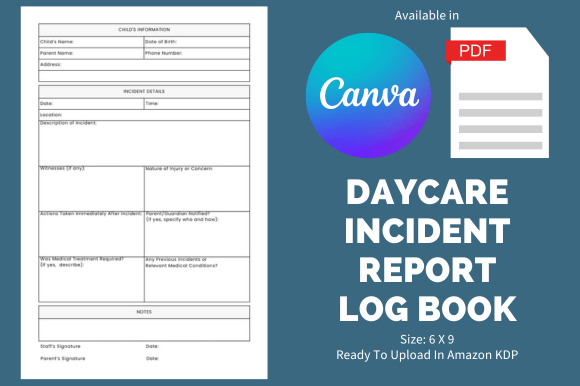
Daycare Incident Report - KDP Template: A Practical Tool for Every Caregiver
If you're running a daycare or looking to start one, keeping track of incidents is more than just a formality—it's a necessity. Whether it's a minor fall, a health concern, or an unexpected event, documenting these moments accurately and consistently is key to maintaining safety, accountability, and peace of mind. That’s where the Daycare Incident Report - KDP Template comes in. This ready-to-use resource is designed to streamline your reporting process and help you focus on what matters most: the well-being of the children in your care.
Unlike generic templates that require hours of customization, this Daycare Incident Report - KDP Template is built with practicality in mind. It’s created using Canva, so you can easily adjust it to match your brand, style, or specific needs without needing advanced design skills. The result? A professional-looking document that’s both functional and personalized.
When and Why You Need a Daycare Incident Report Template
There are countless situations where a structured incident report can make all the difference. For instance, if a child falls during playtime, having a clear record of what happened, when, and who was involved can help you address the issue quickly and prevent future accidents. Similarly, if a child shows signs of illness or has an allergic reaction, a detailed report ensures that parents and healthcare providers have the information they need to act swiftly.
This Daycare Incident Report - KDP Template isn’t just for emergencies. It also helps with routine documentation, such as tracking medication administration, noting changes in behavior, or recording parent communication. These records can be invaluable for legal compliance, insurance claims, and even internal reviews to improve your daycare’s operations.
Real-World Use Cases for the Daycare Incident Report - KDP Template
Imagine you’re a small business owner starting a home-based daycare. You want to ensure that everything is documented properly, but you don’t have the time or resources to create a custom system from scratch. The Daycare Incident Report - KDP Template offers a quick solution. With 110 pages of content, it provides a comprehensive framework that covers everything from basic incident details to follow-up actions and signatures.
For educators and childcare professionals, this template can be a game-changer. It allows you to maintain consistent records across multiple shifts, ensuring that all staff members are on the same page. If a new caregiver joins the team, they can easily refer to past reports to understand the environment and any recurring issues.
Freelancers and content creators who offer digital tools or services might find value in this template too. By offering a downloadable Daycare Incident Report - KDP Template, you can provide a useful product that meets a real need while generating passive income. The editable Canva file makes it easy to update and repackage the template for different audiences or markets.
How Different Users Can Benefit
The beauty of the Daycare Incident Report - KDP Template lies in its versatility. It can be used by anyone who manages or works with children, whether in a formal daycare setting, a private home, or a school environment. For example:
- Parents: You can use the template to keep a personal log of your child’s activities, injuries, or interactions with other children.
- Childcare Providers: This tool helps you maintain accurate records that support your daily operations and meet regulatory requirements.
- Business Owners: As a daycare operator, you can use the template to build a professional image and ensure consistency across all locations.
Even if you’re not directly involved in childcare, the Daycare Incident Report - KDP Template can serve as a model for creating similar documents in other industries. Its structure and approach can be adapted for workplace safety logs, event management reports, or customer service records.
What to Consider Before Using the Template
Before diving into the Daycare Incident Report - KDP Template, it’s important to think about your specific needs. Are you looking for something simple and straightforward, or do you need a more detailed system with multiple sections? The 6 x 9 size and bleed settings make it ideal for printing, but if you plan to use it digitally, you’ll want to confirm that the format works for your workflow.
Also, consider how you’ll update and maintain the template over time. While the Canva version allows for easy edits, you’ll want to set up a system for organizing and storing completed reports. This could involve cloud storage, physical filing cabinets, or a combination of both.
Lastly, always check local regulations and guidelines. Some areas may have specific requirements for incident reporting, and the Daycare Incident Report - KDP Template should be adjusted accordingly. If in doubt, consult with legal or childcare experts to ensure compliance.
Why Choose This KDP Interior?
For entrepreneurs and content creators, the Daycare Incident Report - KDP Template represents a low-effort, high-impact opportunity. It requires minimal time to customize and upload, yet it addresses a genuine need in the market. By offering this resource, you can generate income while helping others streamline their documentation processes.
Whether you’re looking to start a side hustle, expand your product line, or simply save time on administrative tasks, this template is a valuable asset. Its clean design, ease of use, and practical features make it a standout choice for anyone in the childcare industry or beyond.
With the right approach, the Daycare Incident Report - KDP Template can become more than just a tool—it can be a foundation for growth, organization, and confidence in your work.